
Three ways to do it
You can do all of this by hand for free, pay for a tool that keeps the ads for you, or use a tool that also turns them into ideas. The right one depends on how many competitors you watch and how much of the thinking you want to keep.
| Approach | Platforms | History | Ideas | Cost |
|---|---|---|---|---|
| By hand: free libraries and a sheet | Any platform with a public library | Only what you save; Meta drops most ads once they stop | Yours to write | Free, about half an hour a week |
| Ad library and swipe-file tools | Varies by tool; check before you buy | Kept for you, with tags and search | Boards and tags; some add AI-written briefs, so check what they’re based on | Paid subscription |
| Tracking that ends in ideas (Madverts) | Meta Ad Library ads and organic Instagram posts | A record of every ad it has seen, kept after the library drops it | Ad ideas for your brand, then the finished video ad | From $45 a month |
If you watch three to five competitors on Meta, start by hand.
Where to see your competitors’ ads for free
Every big ad platform now publishes a public library of ads. Transparency rules shaped most of them: the EU’s Digital Services Act requires the largest platforms to keep every ad shown in the EU searchable for a year. That’s why the European data is so much richer than anything you’ll see for the US. For a DTC brand, start with Meta’s library: it shows every ad currently running on Meta’s apps, in any country, and you don’t need an account to search it.
| Library | What it covers | What you see | What’s hidden | How long ads stay |
|---|---|---|---|---|
| Meta Ad LibraryPlatform docs | Every ad currently running on Facebook, Instagram, Messenger, Threads, WhatsApp and Audience Network, in any country | The creative and copy, “Started running on” date, platforms, Library ID, and whether the ad has multiple versions | Spend, impressions and targeting for ordinary ads. Estimated impressions, reach and targeting appear only for ads delivered in the EU or UK; spend ranges only for social issue, election or political ads | Ordinary ads: only while running. EU and UK ads: one year after their last impression. Political and issue ads: seven years |
| TikTok Commercial Content LibraryPlatform docs | Ads shown in the 30 EEA countries, Switzerland, Turkey and the UK | First and last shown dates and a range of unique users seen; EEA ads add targeting parameters and reach by location, age and gender | Anything outside Europe: US-only advertisers don’t appear at all. Targeting and reach breakdowns only for EEA ads | One year after the ad was last shown |
| TikTok Creative Center: Top AdsPlatform docs | A curated set of high-performing ads that advertisers authorized for display, filterable by region, industry and objective | Ads you can sort by reach, click-through rate and 2- or 6-second view rate. Logged out, you see only five | Everything a brand didn’t choose to share: it’s a showcase, so you can’t list every ad one competitor runs | Not stated |
| Google Ads Transparency CenterPlatform docs | Ads from verified advertisers on Search, YouTube, Shopping, Play and Maps, plus unverified advertisers in Europe and Türkiye | Text, image and video ads, filterable by region, date, platform and format, with a “Last shown” date | Spend for anything but election ads. Topic, audience selection and a “times shown” range only for ads shown in Europe and Türkiye | One year after the ad was last shown (election ads up to seven years) |
| LinkedIn Ad LibraryPlatform docs | Ads run on LinkedIn, searchable by advertiser, payer, keyword, country and date | The ad and the dates it ran; EU-targeted ads add estimated impressions by country and targeting parameters | Impressions and targeting, except for ads targeted at the EU | One year after the last impression; nothing before June 1, 2023 |
An ordinary ad that ran only in the US drops out of Meta’s library once it stops running, so if you didn’t save it, it’s gone.
Searching the Meta Ad Library, step by step
- Open the Meta Ad Library and pick a country. “All” works for most brands; choose one country if you want to see a competitor’s ads for a specific market.
- Set the ad category to “All ads”. The search box stays grayed out until you pick one.
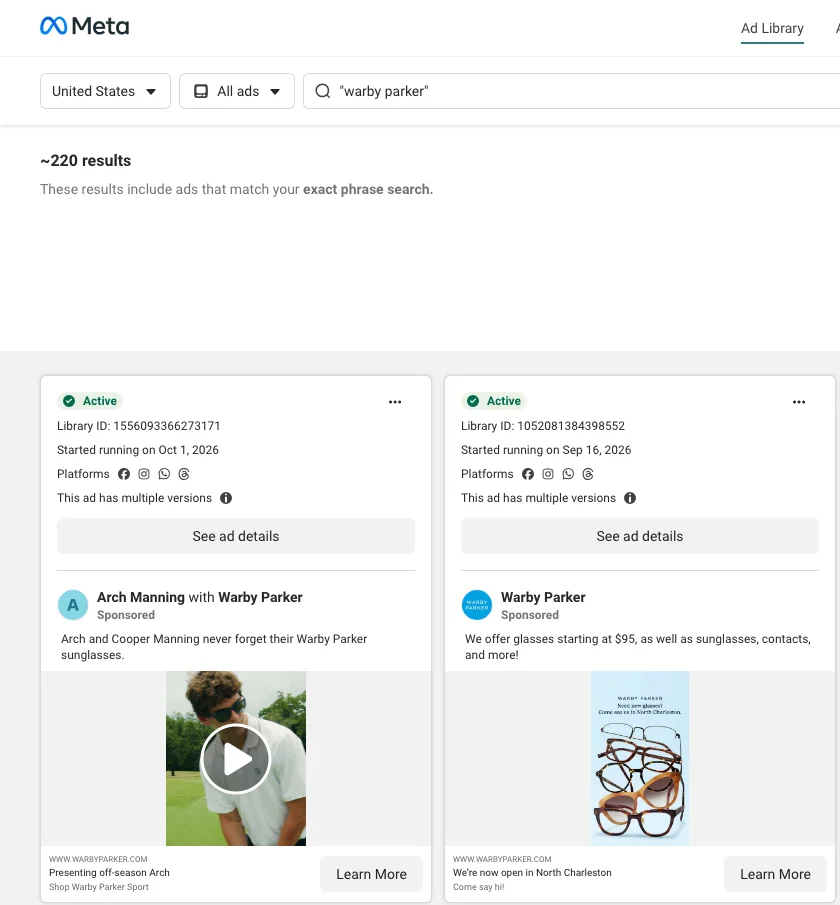
- Type the competitor’s name into “Search by keyword or advertiser” and choose their Page from the Advertisers list. “Search this exact phrase” instead returns every ad that mentions the name, including partnership ads run with creators.
- Open Filters and set Active status to “Active ads”. Media type (videos, images) and Platform (Instagram only, say) narrow it further.
- Read each card: the “Started running on” date, the Library ID (your permanent link to that ad), and “This ad has multiple versions”, which means they’re running variations of it. “See ad details” shows the versions.
- Bookmark the results page. The URL keeps the country, status and Page, so next week the same view is one click away.
TikTok
TikTok’s Commercial Content Library is the real record, but it only covers ads shown in Europe (the EEA, Switzerland, Turkey and the UK). If a competitor only advertises in the US, it shows you nothing. The Creative Center’s Top Ads is a showcase of high-performing ads that advertisers agreed to share, sortable by click-through and view rates. It’s good for spotting formats that work on TikTok in your category, and no use for seeing everything one competitor runs.
Google and LinkedIn
The Google Ads Transparency Center is worth a monthly look if competitors run search or YouTube ads, and the LinkedIn Ad Library if you sell to businesses. One more manual trick: visit a competitor’s product page, accept their cookies, add something to your cart and leave. If they run retargeting and you fall inside their audience rules, some of their follow-up ads may start appearing in your feeds. Treat it as a bonus sighting, not a method you can rely on.
What to record for each ad
Log every ad in a spreadsheet, with the same columns, every week. This lets you spot multiple competitors moving to the same hook in the same month, which would not be possible by just keeping a folder of screenshots.
| Column | What to write | Example |
|---|---|---|
| Brand and ad link | The competitor, and the link to the ad’s own library entry | Brand A, library link |
| Country | The country filter you used, since offers can differ by market | United States |
| Started running | The start date the library shows | August 14 |
| First seen / last seen | The first and the most recent check on which you found it running | Week 1 / Week 2 |
| Changes (dated) | Anything that changed, with the date you noticed | Week 2: 2 versions became 4 |
| Saved creative | A screenshot of the ad, named by its Library ID, for your own reference | 1556093366273171.png |
| Format | Video, image or carousel; length; aspect ratio | 9:16 video, 22 seconds |
| Hook | What happens or is said in the first three seconds | Founder holds up a café receipt |
| Angle | The reason to buy the ad argues | Cheaper per cup than the café |
| Offer and proof | Discount, bundle or none; reviews, numbers, demo, creator | 20% off first order; a review on screen |
| CTA and landing page | Button text, and where the click goes | Shop now, to a bundle page |
| Your note | One line on why it caught your eye | Third brand this month doing café math |
Here’s the same ad on two review days:
- Week 1: live, started August 14, two versions. Logged.
- Week 2: still live, now four versions, same hook, new offer line. Last seen moves to week 2; days running: 52. That’s a brand putting more effort behind something, which is worth a dated note.
If an ad is gone the next week, leave “last seen” alone and add “not found” with the date, rather than “stopped”. It may have been paused, switched to another country, or simply dropped from the library view. One missing week may be a glitch; an ad that never comes back after a sale ends means more.
How to read the signals
Nothing in an ad library tells you an ad worked. Every signal is a guess about two things you can’t see: budget and patience. You’ll often read that an ad running 30 days or more is a “winner”. It’s a reasonable hunch, but plenty of long-running ads are just cheap ones nobody switched off.
| What you see | What it might mean | What else it could mean | How much weight |
|---|---|---|---|
| One ad running for two months or more | It earns enough to keep running | A small always-on budget nobody has revisited, or an awareness ad judged on reach, not sales | Medium, and higher if it also has several versions |
| Many versions of the same ad | They are testing it, so it matters to them | An automated setup (catalog or dynamic creative) that makes versions by default | Medium |
| A burst of new ads in one week | A launch, a sale or a new round of tests | A new agency or freelancer clearing a backlog of creative | Low on its own; check the offer and landing page |
| An ad you logged is gone a week later | It lost its test | A sale ended, budget moved, or the ad was rejected; or the library simply stopped showing it | Low |
| The same hook or angle at three or more competitors | The category has settled on a convention worth knowing | Everyone watches the same ad library, including your competitors, so a format can spread because it’s visible, not because it sells | High as a sign of a category convention; it still isn’t proof that it works |
Our rule of thumb: give the most weight to convergence. One long-running ad could be a forgotten $10 a day. Three competitors landing on the same hook and keeping it for weeks tells you that the hook is a winner. Whether that hook sells for you is what your test is for.
Turning what you see into ad ideas
A tracked ad is only useful once it changes what you test next. Here’s a four-step way to get from a sheet of competitor ads to a brief you can make this week.
- 01ObserveCheck the ad libraries on a schedule
- 02RecordLog each ad in one sheet
- 03ReadSeparate signals from noise
- 04BriefTurn a pattern into your angle
- 05TestLet your own account decide
What the test teaches you changes what you look for next week.
- Find the pattern. Look for the same hook, angle, offer or format at two brands, ideally three.
- Find the gap. Ask what nobody in the sheet is saying. If every competitor sells on price, a quality or ritual angle is open. If everyone runs polished studio video, plain phone-shot footage may stand out.
- Pick your angle. Keep the pattern’s structure and pair it with something only your brand can truthfully say: a product detail, a founder story, a review you actually have.
- Write the test brief. One concept per brief: hook, angle, format, proof, offer, and the one number that decides it.
What to borrow and what to drop
| Borrow the structure | Drop |
|---|---|
| The hook type and its timing, such as opening on the problem in the first two seconds | Their wording, taglines and slogans |
| The format: aspect ratio, length, pacing, phone-shot or studio | Their footage, images, music, logos and brand colors |
| The argument shape: comparison, before and after, myth and fact | Their claims and numbers, which you’d need your own evidence for |
| The offer type: bundle, free shipping, first-order discount | Their creators, customers and reviews |
Copying an ad wholesale is a bad idea for three reasons: it can infringe their copyright or trademarks, it borrows claims you can’t back up, and it makes you the second brand in the feed saying the same thing.
Testing the idea
Treat each idea as a question your own ad account answers, and write the question down before you spend anything.
- Change one thing: test the hook only. Both versions share the same body, offer, landing page, audience and budget; only the first three seconds differ.
- Hypothesis: “Opening on the café queue gets cheaper add-to-carts than opening on the receipt.”
- One metric: the one closest to a sale that gets enough events to compare, such as cost per add to cart.
- Decision rule, written before launch: how long it runs, the minimum number of add-to-carts each version needs, and how much cheaper the winner has to be. If either version falls short of the minimum, call the result inconclusive rather than a win for whichever looks cheaper.
Meta’s A/B testing tool splits the audience so the versions don’t compete with each other. When a concept wins, add it to your sheet with its result, so next month’s patterns are read against something you’ve measured.
The limitations of free libraries
The free libraries are enough for a handful of competitors on Meta. Paid tools earn their price when you watch many brands, need history the libraries delete, or work across several platforms. They fall into five rough groups:
- Swipe files and creative libraries save ads for good and let you tag them: Foreplay, Atria, and MagicBrief.
- Multi-network ad databases search many platforms at once: AdSpyder and BigSpy.
- Search ad intelligence shows which keywords competitors bid on: SpyFu and Semrush.
- Spend estimates model what bigger advertisers spend: Sensor Tower (which owns Pathmatics).
- Page monitors alert you when a competitor’s library page changes: Visualping.
None of them can see a competitor’s results either; what you’re paying for is time and history. Before you buy, check which platforms a tool covers and how far back its history goes, because both vary a lot.
How Madverts is different
Madverts runs the whole loop above for you, from tracking your competitors’ ads to making the finished video ad.
- When you sign up it suggests competitors for your brand. Approve them or add your own.
- It checks each competitor’s Meta Ad Library page on a schedule (weekly on Starter, daily on Growth, every two hours on Pro), tracks and analyzes their organic Instagram posts, and keeps a record of every ad it has seen, even after Meta stops showing it.
- Each ad is analyzed for hook, angle, format, offer and funnel stage, so the patterns are already laid out in its market intelligence view.
- As evidence builds up across your competitors, it turns the patterns into ad ideas for your brand, with the reasoning attached. Pick one and Madverts makes the finished video ad.
- “Copy this ad” takes a competitor ad’s structure (hook, script shape, pacing) and rebuilds it for your brand, in your own words.
FAQ
Can you see a competitor’s ad spend?
Not for ordinary commercial ads. Meta shows spend ranges only for ads about social issues, elections or politics, and none of the libraries report sales or conversions. Tools that show competitor spend are estimating it from panels and models, so treat their numbers as rough, especially for small brands.
Is tracking competitor ads legal?
Looking is fine: the public ad libraries exist so anyone can see the ads. Reusing what you find is a different question. A competitor’s footage, wording, music and trademarks belong to them, so borrow structure, not material. (This isn’t legal advice; if you’re about to run something close to a competitor’s ad, ask someone who gives it.)
How often should you check competitor ads?
Weekly suits most DTC brands. Check daily around big sale periods or a competitor’s launch. Meta drops most ordinary ads from its library once they stop running, so if you only look once a month you’ll miss short tests entirely.
Can I see a competitor’s TikTok ads?
Only partly. TikTok’s Commercial Content Library lists ads shown in the EEA, Switzerland, Turkey and the UK, so a competitor that only advertises in the US won’t be there. The Creative Center’s Top Ads shows a curated set of strong ads by region and industry, not a particular brand’s full list.
How many competitors should you track?
Three to five direct competitors is plenty for a one-person brand. Add one or two brands from outside your category that sell to the same customer; they’re often where new hooks come from.